Claude Code For Non-programmers: Automating Daily Tasks
Learn to automate everyday tasks using Claude AI without writing code
This course introduces a practical way for non-programmers to use Claude Code to automate everyday tasks using natural language instead of traditional coding. Through hands-on examples, you will learn how to manage files, process data, and build simple automation workflows that streamline daily work. By combining AI capabilities with real tools and integrations, the course helps you turn repetitive processes into efficient, automated solutions — without needing any programming background.
What you'll learn
- ✓ Set up and use Claude Code for automation
- ✓ Organize and manage files automatically
- ✓ Convert data into polished reports
- ✓ Generate marketing content with AI
- ✓ Automate invoice and document processing
- ✓ Create web applications from workflows
- ✓ Build custom automation solutions
- ✓ Integrate Claude with your daily tools
- ✓ Save time on repetitive tasks
- ✓ Increase productivity without coding
Course content
01 - Automating Daily Tasks 6 lectures • 38 min
Requirements
- Basic computer skills
- Access to Claude AI
- Willingness to learn new tools
- No programming experience needed
- Internet connection
- Enthusiasm for automation
Claude Code for Non-Programmers – Automate Daily Tasks Without Writing Code
Want to build functional applications using natural language prompts instead of traditional programming? This course shows you how to use Claude Code to automate real-world workflows — even if you have zero coding experience.
Designed specifically for non-developers, entrepreneurs, marketers, and operations professionals, this hands-on training teaches you how to transform everyday tasks into automated systems using AI-powered automation tools. You will set up Claude Code locally, connect it to external tools, and create practical automation workflows that save time and increase productivity.
You can see more courses about this AI category at here:
- Ai For Creative Professionals: Learning Completely 15 Tools In 1 Course
- Attacking Mcp Servers And Ai Apps: A Practical Course
- Data Entry Skills - A Complete Data Entry Course With Ai
What You Will Learn
Set Up Claude Code Locally
You will learn how to:
- Install and configure Claude Code on your local environment
- Work with files, folders, and structured data
- Understand how Claude executes multi-step tasks
- Manage automation workflows securely
No prior programming or technical background is required.
Build Real-World Automation Projects
This is a project-driven course. You will build practical tools that can be used immediately in business or personal workflows.
Projects include:
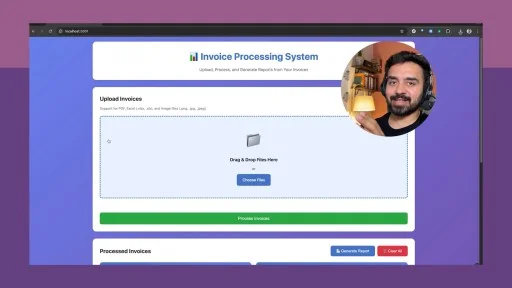
- A fully functional invoice processing automation tool
- Large dataset analysis using AI-driven workflows
- Multi-step task chaining (organize → process → generate output)
- Automated marketing content generation
These exercises demonstrate how AI automation for business can eliminate repetitive manual work.
Integrate External Tools with MCP Servers
You will also learn how to:
- Connect Claude Code to external platforms like Notion
- Use MCP servers (Model Context Protocol) to extend automation capabilities
- Fetch, process, and update structured information across tools
This enables you to build integrated systems instead of isolated scripts.
Automate Multi-Step Workflows Without Programming
One of the most powerful aspects of this course is learning how to design multi-step automation processes using natural language instructions.
You will gain the ability to:
- Chain tasks together logically
- Automate repetitive administrative work
- Create small internal tools (“mini-products”)
- Streamline operations across marketing, finance, and content workflows
This is ideal for professionals who want to leverage AI workflow automation without becoming developers.
Who This Course Is For
- Non-programmers exploring AI automation tools
- Business owners wanting to automate repetitive processes
- Marketers managing content production workflows
- Operations professionals handling data and reporting
- Anyone curious about building applications without coding
Why This Course Matters
The future of productivity is increasingly powered by AI automation and no-code tools. Learning how to turn natural language into functional applications gives you a significant competitive advantage — especially if you do not come from a technical background.
By the end of this course, you will:
- Build practical automation systems
- Manage files and structured data using Claude Code
- Integrate AI with external tools like Notion
- Automate complex workflows confidently
If you're ready to stop doing repetitive manual work and start building AI-powered automation systems —
👉 Enroll now and start automating your daily tasks with Claude Code today.
Frequently Asked Questions
What is the Claude Code for Non-Programmers course about?
This course teaches how to automate daily work using Claude Code without programming knowledge by turning natural language instructions into practical automation workflows and applications.
Who is this course designed for?
The course is designed for office workers, marketers, business owners, freelancers, operations staff, and anyone who wants to automate tasks using AI without learning to code.
Do I need programming experience to join this course?
No. The course is specifically created for non-programmers and requires no coding or technical background.
What will I learn about Claude Code?
You will learn how to install and run Claude Code locally, manage structured files and data, understand multi-step task execution, and build secure automation workflows.
What types of automation projects will I build?
You will create practical automation tools such as invoice processing automation, AI-powered data analysis workflows, multi-step content generation pipelines, and marketing automation systems.
Can Claude Code automate business workflows?
Yes. The course demonstrates how to use AI automation to organize, process, and generate outputs across business operations and daily work processes.
Will I learn to integrate Claude Code with external tools?
Yes. You will learn how to connect Claude Code with tools like Notion and MCP servers to exchange data and build connected automation systems.
What is MCP Server integration in this course?
MCP Server integration allows Claude Code to interact with external tools and data sources, enabling advanced automation across multiple platforms.
Can I build automation workflows without coding?
Yes. You will design multi-step AI workflows using natural language instructions instead of traditional programming.
How can this course improve productivity?
By automating repetitive tasks, reducing manual operations, and streamlining workflows, learners can save time and significantly increase work efficiency.
Is this course useful for marketers and business owners?
Yes. Marketers and business owners can automate content creation, data organization, and operational processes using AI automation tools.
What will I achieve after completing the course?
You will be able to build no-code AI tools, automate multi-step workflows, integrate AI with productivity platforms, and optimize daily work using Claude Code.
About the Instructor

Harshit Tyagi
Claude AI Specialist & Automation Coach
Experienced automation specialist who helps non-technical professionals leverage AI to streamline their workflows. Has trained thousands of users to automate their daily tasks with Claude.
This course includes:
- 🎥On-demand video
- 📥Downloadable resources
- 📱Access on mobile and TV
- ♾️Full lifetime access
- 🏆Certificate of completion